Great article in Millimeter about using an HDSLR to make a successful feature.
'For Lovers Only:' Michael and Mark Polish's No-Budget Digital Dream Project, Jon Silberg
Friday, October 14, 2011


Friday, October 7, 2011
How Do Networks Evaluate Pitches? Coverage Case Study: “O.C. Gaffer” 2/3 | Documentary Television
More great info for those of you wanting to create the next big hit series!
How Do Networks Evaluate Pitches? Coverage Case Study: “O.C. Gaffer” 2/3 | Documentary Television
How Do Networks Evaluate Pitches? Coverage Case Study: “O.C. Gaffer” 2/3 | Documentary Television
How Do Networks Evaluate Pitches? Coverage Case Study: A&E’s Stephen Harris and “O.C. Gaffer” (1/3) | Documentary Television
Interested in pitching the next great reality show to the networks? This is great info you'll need.
How Do Networks Evaluate Pitches? Coverage Case Study: A&E’s Stephen Harris and “O.C. Gaffer” (1/3) | Documentary Television
How Do Networks Evaluate Pitches? Coverage Case Study: A&E’s Stephen Harris and “O.C. Gaffer” (1/3) | Documentary Television
Thursday, November 4, 2010
HDSLR and You
If you’re been poking around the trade mags lately, or reading anything online about film and video production, then you’ve probably heard about the use of still cameras (DSLRs) for film and video production. This revolution, or more precisely evolution in technology has begun the creative professional some great new options for the creation and acquisition of footage and images. As with all new tools, however, it takes time to sort out what applications best fit the technology, and what types of projects can best benefit from the unique strengths and weaknesses of the tool.

While some of the gear-heads out there might prefer an in-depth discussion of the technical aspects of this new technology, I’m going to opt for a simple explanation, followed by a more in depth discussion of features, benefits and applications of the technology.
The simple description of Digital Single Lens Reflex (DSLR) cameras is that they are digital versions of their analog, film-based ancestors. Knowing that however fails to explain why they have become popular for shooting moving images. The introduction of High Definition DSLRs with integrated HD video capture was the jumping off point for the use of DSLRs for anything other than high-quality still image capture. These hybrid cameras look exactly like their still image cousins, but have the ability to capture amazingly high-quality HD video footage, while retaining all of the benefits of still image capture.
So what does this all mean to you and your project? That’s the question I will spend the rest of this post answering.
First off, these cameras have some great benefits. First off, they allow the Director of Photography an amazing array of great lenses. In fact, in my opinion, this might be the single greatest part of this technology. In fact, if your project requires the ability to have maximum control over depth of field and/or a high-degree of clarity, using an HD DSLR allows you to choose the exact lens for the job. Traditional video camera typically offer a much smaller range of available lenses unless you use a lens adapter system.

In addition to the huge number of lenses available for these cameras, they also offer really great dynamic range and full-sized sensors. This means that, although video capture was not their primary designed use, they provide an amazingly high image quality and clarity. In fact, most HD DSLRs have a larger sensor than my dedicated HD video camera.
If you’ve been following video technology for a while, then you know every advance comes at a price, and HD DSLRs are no exception. The first, and largest drawback, is is the sound recording capability of these cameras. As you might expect, engineers who excel at making great still images are not necessarily great at working with sound recording (or might not even really understand what is needed.) What that means is that many, if not all of these cameras are missing some essential tools for proper sound capture--things like professional audio inputs, mic/line level control, input level control, choice of sample rate and number of channels, etc. What these drawbacks mean is that if you are recording critical sound using one of these cameras, you are going to want an external device to do it. While there are many options in this regard, it does mean that you will have to re-sync your sound in post--something many of us have not had to do in a very long time.
The benefits and drawbacks make the HD DSLR a great choice for projects like music videos, scientific videos, and even some types of interview-driven videos (if you have a secondary means of audio recording.) The high quality, combined with the relatively low cost of the cameras has also made the HD DSLR an independent filmmaker’s favorite tool. We have also used our HD DSLR to do time-lapse capture, as a second camera on single person stand-ups, and to create simple stop motion effects.
The bottom line is that the HD DSLR is an awesome new tool in our box--one that we really enjoy bringing to our projects and yours.
Viva Technology!
Tuesday, July 27, 2010
Using Stock Footage/Photography to Spice Up Your Video
I'm going to start this post by apologizing to all of the great DPs who work with us. I am NOT trying to put you out of business. In fact, at the end of the post, I will tell how YOU can get in on the stock footage market and make some extra money on those handful of days per year you're not out shooting for us.
OK. On to the subject at hand. Why should you consider using stock footage and photography in your videos? There are a lot of answers to this question, but my favorite is, "Because it allows you to greatly expand your creative vision without greatly expanding your budget!"
 How can this be?! The answer is simple. There are more stock footage and photography resources, more stock footage and photography producers, and more stock footage shots than there have ever been before. And that number is growing by leaps and bounds every minute of every day thanks to the explosion of great online stock footage services available.
To use these services takes a little understanding of how they work. First off, there are sites that prefer to work on a licensing basis, where footage is licensed for a specific project at a specific price. These sites often have the most visually stunning and spectacular shots, but, this quality comes at a price. Getty Images is an example of a site that uses this pricing and licensing model.
The other, more cost effective model is the buy-out or subscription model. iStockphoto, Pond 5 and Revostock are sites that work on these models. The libraries are typically a little more limited on these sites, however the value you get for the dollar paid, plus the more user-friendly licensing models more than make up for any deficiencies. Many of these sites also offer music, graphics, flash, animations and sound fx using the same models.
I'll give you an example of how stock footage can be used to creatively deliver greater impact. In one of our current projects, a client is having us produce a video about managing change for a leadership conference. The initial concept was to have some of the key players do interviews where they frankly discuss the changes they've faced and how they've managed change. We felt this was a great way to get people to connect with each other around a very sensitive topic, yet, being visual communicators, we wanted a means of conveying change visually. It was at this point that we realized that there is a whole world of great footage out there that conveys change (time lapse, natural shots, etc.) and that this footage could be used to open and close the video and be used as background for graphics that would illustrate key messages. Voila--the addition of stock footage takes a good video and makes it great!
So, the next time you've got a creative concept that begs for stylized footage that it would be too time consuming or costly to shoot yourself, consider adding some stock footage or photography. You'll be glad you did.

OK-DPs, this is just for you. You can make the best of the stock footage phenomenon by becoming a contributor. I recommend starting with iStockphoto, Pond5, and Revostock and expanding out from there.
OK. On to the subject at hand. Why should you consider using stock footage and photography in your videos? There are a lot of answers to this question, but my favorite is, "Because it allows you to greatly expand your creative vision without greatly expanding your budget!"

To use these services takes a little understanding of how they work. First off, there are sites that prefer to work on a licensing basis, where footage is licensed for a specific project at a specific price. These sites often have the most visually stunning and spectacular shots, but, this quality comes at a price. Getty Images is an example of a site that uses this pricing and licensing model.
The other, more cost effective model is the buy-out or subscription model. iStockphoto, Pond 5 and Revostock are sites that work on these models. The libraries are typically a little more limited on these sites, however the value you get for the dollar paid, plus the more user-friendly licensing models more than make up for any deficiencies. Many of these sites also offer music, graphics, flash, animations and sound fx using the same models.
I'll give you an example of how stock footage can be used to creatively deliver greater impact. In one of our current projects, a client is having us produce a video about managing change for a leadership conference. The initial concept was to have some of the key players do interviews where they frankly discuss the changes they've faced and how they've managed change. We felt this was a great way to get people to connect with each other around a very sensitive topic, yet, being visual communicators, we wanted a means of conveying change visually. It was at this point that we realized that there is a whole world of great footage out there that conveys change (time lapse, natural shots, etc.) and that this footage could be used to open and close the video and be used as background for graphics that would illustrate key messages. Voila--the addition of stock footage takes a good video and makes it great!
So, the next time you've got a creative concept that begs for stylized footage that it would be too time consuming or costly to shoot yourself, consider adding some stock footage or photography. You'll be glad you did.

OK-DPs, this is just for you. You can make the best of the stock footage phenomenon by becoming a contributor. I recommend starting with iStockphoto, Pond5, and Revostock and expanding out from there.
Monday, May 3, 2010
The More Things Change...
As we enter our 20th year of business I took a few minutes this month to think about the dramatic changes that have transformed our business in the last two decades. As I was doing that, I realized that the obvious, dramatic, and transformative change is interesting to consider, but the constants (which are less obvious) are equally and often more compelling to consider. It is these constants that I will focus on in this post.
When I started thinking about the things that have changed very little in the last twenty years, the first thing that struck me is that good people always find work (or is it, work always finds good people?!) What I mean by that is that even though an explosion in cheap, relatively high quality video gear has brought a huge influx of people into the business, I see the same talented people, year after year, working on project after project. That's not to say that there isn't great new talent out there--there is--it's just that establishing yourself as a talented professional in this business is still a huge and difficult task, requiring dedication, long hours, and a LOT of humility and most people don't have what it takes to make it for the long haul.
The other constant I've noticed is that the basic skill set that is required to produce high quality videos has changed very little in the last 20 years. Sure, some jobs dealing with specific aspects of the technology have changed, but the basic skills like producing, directing, writing, lighting, shooting, acting, and sound acquisition have changed very little. I have to laugh every time I hear about how some new technology (camera, edit software, etc.) is going to revolutionize film and video work and get budgets down so low that anyone can now make Hollywood Movies.
The truth of the matter is simple--great films and videos are made by talented people. Cameras and software are just tools and great tools in untalented hands still produce poor results. As for budgets getting lower, it is true that the tools are somewhat less expensive, but the single greatest cost for most projects is not the tools, it's the people who operate them. I mean, the tools for building construction have also come down dramatically in price, yet it is still more expensive to construct a building today than it was 20 years ago--the same is true in this business.
So what is the takeaway from this? If you want to make a great video, hire great people and let them bring the right tools for your job.
When I started thinking about the things that have changed very little in the last twenty years, the first thing that struck me is that good people always find work (or is it, work always finds good people?!) What I mean by that is that even though an explosion in cheap, relatively high quality video gear has brought a huge influx of people into the business, I see the same talented people, year after year, working on project after project. That's not to say that there isn't great new talent out there--there is--it's just that establishing yourself as a talented professional in this business is still a huge and difficult task, requiring dedication, long hours, and a LOT of humility and most people don't have what it takes to make it for the long haul.
The other constant I've noticed is that the basic skill set that is required to produce high quality videos has changed very little in the last 20 years. Sure, some jobs dealing with specific aspects of the technology have changed, but the basic skills like producing, directing, writing, lighting, shooting, acting, and sound acquisition have changed very little. I have to laugh every time I hear about how some new technology (camera, edit software, etc.) is going to revolutionize film and video work and get budgets down so low that anyone can now make Hollywood Movies.
The truth of the matter is simple--great films and videos are made by talented people. Cameras and software are just tools and great tools in untalented hands still produce poor results. As for budgets getting lower, it is true that the tools are somewhat less expensive, but the single greatest cost for most projects is not the tools, it's the people who operate them. I mean, the tools for building construction have also come down dramatically in price, yet it is still more expensive to construct a building today than it was 20 years ago--the same is true in this business.
So what is the takeaway from this? If you want to make a great video, hire great people and let them bring the right tools for your job.
Monday, November 2, 2009
Going Tapeless to Save Time and Money
After 18 years of being in this business, I am hardly the one to breathlessly promote every new video technology that comes down the road. In fact, if you ask my friends, they'll tell you that I'm more than a little cynical about the "next big thing that's going to revolutionize the production process!" I've simply seen too many of these come and go to get overly excited at any single product release.
Occasionally, however, a technology comes along that truly IS revolutionary (or at least evolutionary,) and then, after all the hype had died down, I'll usually be the last one to tout the merits of the technology. Today's post is a prime example of my policy of being last to the table. (For those of you hoping to hear me tout Avid's Camcutter technology or JVC's D9 format, you'll just have to keep waiting... ) This post will focus on tapeless production technologies and a specific application where we saved time and money for a client.
What Are Tapeless Production Technolgies?
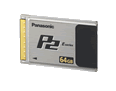
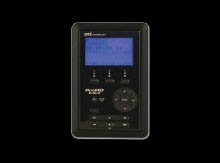
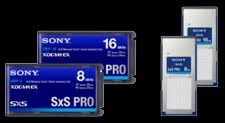
I'm glad you asked. When I talk about tapeless, I really mean "media-less"--that is, recording systems where video is being recorded on re-usable media as files, and where the recorded files can be directly transferred to a computer and hard drive without the use of additional hardware (like VTRs, media readers, etc.) Some of the most common professional examples are Panasonic's P2 card technology and Sony's SxS technology (which are solid state "flash" memory based) and portable hard drive recorders like the Focus Enhancements Firestore. There are also consumer level camcorders that record to flash memory, but for this post, I'll focus on the professional solutions.
How do tapeless production technolgies save time and money?
As with any new technology that drastically changes the way things are done, it takes some careful consideration (and mistake making) to figure out the best way to apply it. Now that we've been using these technologies for about three years, we've come up with some pretty good techniques for their application.
The most obvious cost savings is attained by virtue of the fact that you are not buying and using tape stock. For some projects, this can be a significant savings. Another way tapeless technologies can save time and money is that they allow some of the logging and marking of footage to be done during production. For example, each question and answer of an interview can be recorded into a separate file, so that when brought into the edit system, the interview is already partially logged. This saves tons of time (and money) in the capture, logging and editing process. Additional time and money can be saved at the end of the project during archiving since you will now be archiving digital assets instead of video tapes.
If you look at a specific example of an actual production, the savings and advantages become more obvious.
A Tapeless Work-Flow Case Study:
Recently, one of our clients brought us in to make a kick off video for an upcoming meeting. As we got into discussion of the project, it became clear that there would actually be four days of meetings and that they would want a video to kick off each day's theme plus two additional videos for one of the breakout sessions. An additional challenge also came up in that meeting: We would need to interview more than 50 team members over a period of 20 days in no fewer than 10 cities across North America. Then the final challenge was issued: At the end of shooting, we would have less than a week to edit and deliver all of the videos.
Our first thought was, "NO WAY, this can't be done!" Then, we sat down and started figuring out how it could be done and came up with a plan. (It is simply not in our nature to say no... ) Eventually, we decided that we could do the project if we had a way to shoot the footage, while simultaneously pre-logging it. We would also need a way of sorting and editing the footage at the end of each day, while we traveled. Five years ago, this would have been impossible, but today, using tapeless production technologies, we were able to do exactly that.
The first tool we knew we would need was a camera that could record to solid state media. We decided to shoot with our Panasonic HVX200 in beautiful HD right onto P2 cards. Separate files were created for each answer (whenever possible) and the footage was transferred into Final Cut Studio on a MacBook Pro on location, as we shot. At the end of the day, we would trim up the answers in FCS so that when we returned, the editor could literally get right to the business of editing. We also pre-composed all motion graphics and titles in Adobe After Effects CS4 so that these could be dropped into the edit at the end of production. In the end, we completed the videos right on time--to rave reviews from our client.
The result of our solid planning and this new technology was that we saved time and money at every stage of the production process AND we were able to take on a project and create stunning results in a way that would not have been possible only a few years ago.
While these technologies are not necessarily for every project you will encounter, I believe they will be an increasingly important part of the professional production toolbox moving forward.
Occasionally, however, a technology comes along that truly IS revolutionary (or at least evolutionary,) and then, after all the hype had died down, I'll usually be the last one to tout the merits of the technology. Today's post is a prime example of my policy of being last to the table. (For those of you hoping to hear me tout Avid's Camcutter technology or JVC's D9 format, you'll just have to keep waiting... ) This post will focus on tapeless production technologies and a specific application where we saved time and money for a client.
What Are Tapeless Production Technolgies?
I'm glad you asked. When I talk about tapeless, I really mean "media-less"--that is, recording systems where video is being recorded on re-usable media as files, and where the recorded files can be directly transferred to a computer and hard drive without the use of additional hardware (like VTRs, media readers, etc.) Some of the most common professional examples are Panasonic's P2 card technology and Sony's SxS technology (which are solid state "flash" memory based) and portable hard drive recorders like the Focus Enhancements Firestore. There are also consumer level camcorders that record to flash memory, but for this post, I'll focus on the professional solutions.


How do tapeless production technolgies save time and money?
As with any new technology that drastically changes the way things are done, it takes some careful consideration (and mistake making) to figure out the best way to apply it. Now that we've been using these technologies for about three years, we've come up with some pretty good techniques for their application.
The most obvious cost savings is attained by virtue of the fact that you are not buying and using tape stock. For some projects, this can be a significant savings. Another way tapeless technologies can save time and money is that they allow some of the logging and marking of footage to be done during production. For example, each question and answer of an interview can be recorded into a separate file, so that when brought into the edit system, the interview is already partially logged. This saves tons of time (and money) in the capture, logging and editing process. Additional time and money can be saved at the end of the project during archiving since you will now be archiving digital assets instead of video tapes.
If you look at a specific example of an actual production, the savings and advantages become more obvious.
A Tapeless Work-Flow Case Study:
Recently, one of our clients brought us in to make a kick off video for an upcoming meeting. As we got into discussion of the project, it became clear that there would actually be four days of meetings and that they would want a video to kick off each day's theme plus two additional videos for one of the breakout sessions. An additional challenge also came up in that meeting: We would need to interview more than 50 team members over a period of 20 days in no fewer than 10 cities across North America. Then the final challenge was issued: At the end of shooting, we would have less than a week to edit and deliver all of the videos.
Our first thought was, "NO WAY, this can't be done!" Then, we sat down and started figuring out how it could be done and came up with a plan. (It is simply not in our nature to say no... ) Eventually, we decided that we could do the project if we had a way to shoot the footage, while simultaneously pre-logging it. We would also need a way of sorting and editing the footage at the end of each day, while we traveled. Five years ago, this would have been impossible, but today, using tapeless production technologies, we were able to do exactly that.
The first tool we knew we would need was a camera that could record to solid state media. We decided to shoot with our Panasonic HVX200 in beautiful HD right onto P2 cards. Separate files were created for each answer (whenever possible) and the footage was transferred into Final Cut Studio on a MacBook Pro on location, as we shot. At the end of the day, we would trim up the answers in FCS so that when we returned, the editor could literally get right to the business of editing. We also pre-composed all motion graphics and titles in Adobe After Effects CS4 so that these could be dropped into the edit at the end of production. In the end, we completed the videos right on time--to rave reviews from our client.
The result of our solid planning and this new technology was that we saved time and money at every stage of the production process AND we were able to take on a project and create stunning results in a way that would not have been possible only a few years ago.
While these technologies are not necessarily for every project you will encounter, I believe they will be an increasingly important part of the professional production toolbox moving forward.
Subscribe to:
Posts (Atom)


